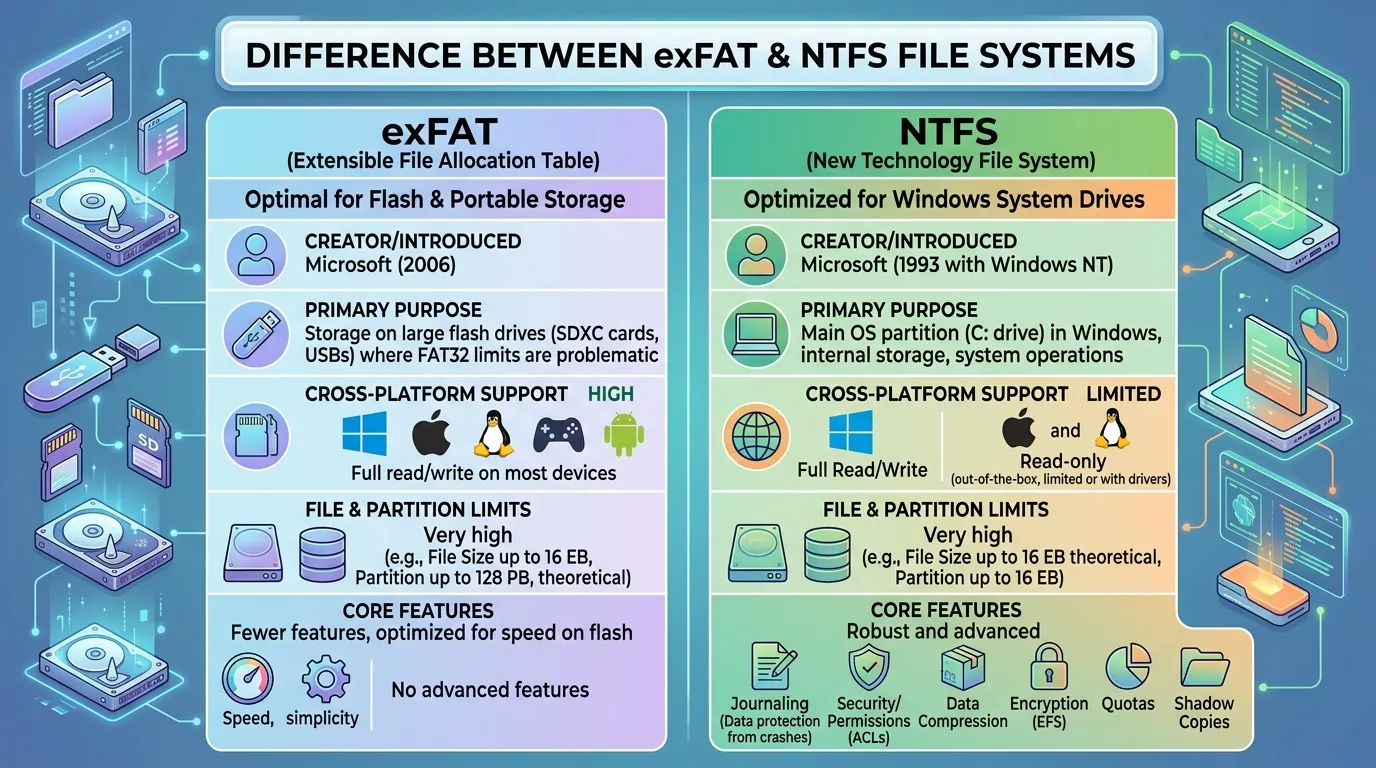
Imagine you’ve just bought a new USB drive to transfer important files between your laptop and office computer. You plug it in, and suddenly you’re asked to choose a format exFAT or NTFS. At first glance, these technical terms seem confusing, but they play a critical role in how your data is stored, accessed, and protected. Understanding the difference between exFAT and NTFS can save you from compatibility issues and even data loss.
The difference between exFAT and NTFS lies in their design and usage. While one is built for flexibility and portability, the other is optimized for performance and security. Many users encounter this dilemma when formatting drives, yet few truly understand it.
Learning the difference between exFAT vs NTFS is essential for both beginners and professionals who deal with data storage daily.
Key Difference Between the Both
The main difference is simple:
exFAT is designed for portability and compatibility, while NTFS is designed for performance, security, and reliability on Windows systems.
Why Is Their Difference Important for Learners and Experts?
Understanding the difference between exFAT and NTFS is crucial in today’s digital society. Students, professionals, and IT experts rely on storage devices daily. Choosing the wrong file system can lead to slow performance, file corruption, or compatibility issues.
For learners, it builds foundational knowledge about how computers manage data. For experts, it ensures efficient system management, data protection, and optimal performance in professional environments like offices, studios, and data centers. In a world driven by data, this knowledge is not optional—it’s essential.
Pronunciation of Both (US & UK)
- exFAT:
- US: /ˌɛksˈfæt/
- UK: /ˌɛksˈfæt/
- NTFS:
- US: /ˌɛn tiː ɛf ˈɛs/
- UK: /ˌɛn tiː ɛf ˈɛs/
Now that you know how to say them correctly, let’s explore their differences in detail.
Difference Between exFAT and NTFS
1. Compatibility
- exFAT works on Windows, macOS, and many devices.
- Example 1: USB used on Windows and Mac.
- Example 2: Camera SD cards.
- NTFS mainly works on Windows.
- Example 1: Windows system drives.
- Example 2: External drives limited on Mac (read-only).
2. File Size Support
- exFAT supports very large files.
- Example 1: 4K videos.
- Example 2: Large backups.
- NTFS also supports large files with advanced structure.
- Example 1: System files.
- Example 2: Databases.
3. Security
- exFAT has no built-in security.
- Example 1: No encryption.
- Example 2: No permissions.
- NTFS offers strong security features.
- Example 1: File permissions.
- Example 2: Encryption.
4. Performance
- exFAT is lightweight and fast for simple use.
- Example 1: USB transfers.
- Example 2: SD cards.
- NTFS is optimized for performance.
- Example 1: System operations.
- Example 2: Large file handling.
5. Journaling
- exFAT does not use journaling.
- Example 1: Risk of corruption.
- Example 2: Less recovery support.
- NTFS uses journaling.
- Example 1: Data recovery.
- Example 2: Crash protection.
6. Usage Purpose
- exFAT is for external storage.
- Example 1: Flash drives.
- Example 2: Memory cards.
- NTFS is for internal drives.
- Example 1: Windows OS drive.
- Example 2: Workstations.
7. Speed
- exFAT is faster for small transfers.
- Example 1: Copying photos.
- Example 2: Music files.
- NTFS handles complex tasks better.
- Example 1: Software installs.
- Example 2: System updates.
8. File Permissions
- exFAT has no permission control.
- Example 1: Open access files.
- Example 2: Shared drives.
- NTFS supports permissions.
- Example 1: User restrictions.
- Example 2: Secure folders.
9. Reliability
- exFAT is less reliable.
- Example 1: Sudden removal risks.
- Example 2: Data corruption chances.
- NTFS is highly reliable.
- Example 1: Error recovery.
- Example 2: Data protection.
10. Use in Devices
- exFAT works in many devices.
- Example 1: TVs.
- Example 2: Gaming consoles.
- NTFS is mostly for PCs.
- Example 1: Windows laptops.
- Example 2: Servers.
Nature and Behaviour of Both
exFAT is flexible, lightweight, and designed for portability. It behaves like a universal traveler, moving easily across devices without restrictions.
NTFS is structured, secure, and powerful. It behaves like a professional system, focusing on stability, control, and performance.
Why People Are Confused About Their Use?
| Feature | exFAT | NTFS |
| Compatibility | High | Limited |
| Security | Low | High |
| Speed | Moderate | High |
| Reliability | Moderate | High |
| Best Use | External devices | Internal drives |
Similarity: Both support large files and are modern file systems.
Which Is Better in What Situation?
exFAT is better when you need portability. If you frequently transfer files between different operating systems or devices like cameras, TVs, or gaming consoles, exFAT is the ideal choice. It ensures smooth compatibility without needing reformatting.
NTFS is better for performance and security. If you are working on a Windows system, installing software, or storing sensitive data, NTFS is the superior option due to its advanced features like encryption and journaling.
Use in Metaphors and Similes
- exFAT is like a “universal adapter” — it fits everywhere.
- NTFS is like a “secure vault” — strong and reliable.
Connotative Meaning
- exFAT
- Positive: Flexible, portable
- Negative: Less secure
- Example: “This drive is as flexible as exFAT.”
- NTFS
- Positive: Secure, powerful
- Negative: Limited compatibility
- Example: “His system is as strong as NTFS.”
Idioms or Proverbs Related
(Not directly available, but adapted usage)
- “Safety first” (NTFS example: Secure storage)
- “Go anywhere” (exFAT example: Portable drives)
Works in Literature
(File systems are technical terms, so not directly used in literature, but appear in tech writing)
- Technical manuals (Genre: Technology, Various authors, 2000s–present)
- Computer science textbooks (Genre: Education)
Movies Related to Both
(No direct movies exist on file systems, but appear in tech-based films)
- Tech documentaries (Various countries, 2010s–present)
FAQs
1. What is the main difference between exFAT and NTFS?
exFAT is for portability, while NTFS is for security and performance.
2. Which is better for USB drives?
exFAT is usually better for USB drives.
3. Can NTFS work on Mac?
Yes, but mostly in read-only mode.
4. Is exFAT safe?
It is safe but lacks advanced security features.
5. Which one should I choose?
Choose based on your need: compatibility (exFAT) or security (NTFS).
How Both Are Useful for Surroundings
Both file systems support modern digital environments. exFAT enables smooth data sharing across devices, while NTFS ensures secure and efficient system operations. Together, they help maintain the digital ecosystem we rely on daily.
Final Words for Both
exFAT represents flexibility and accessibility, while NTFS stands for strength and security. Choosing the right one depends entirely on your purpose.
Conclusion
Understanding the difference between exFAT and NTFS empowers users to make smarter decisions about data storage. While exFAT excels in compatibility and portability, NTFS dominates in performance and security. Both serve important roles in modern computing, and neither is universally better—they simply fit different needs. By recognizing their strengths and limitations, you can optimize your storage devices and avoid common mistakes. Whether you are a beginner or an expert, mastering exFAT vs NTFS this comparison is a valuable step toward better digital management.

I am content creator and comparison blogger focused on analyzing key differences between terms, concepts, and ideas to deliver accurate, easy-to-understand information. So I decided to create a platform where these differences are explained in the simplest way possible.