If you’ve ever looked for productivity tools for work, study, or business, chances are you’ve come across Microsoft 365 and Office 365. At first, they look almost identical—both include popular apps like Microsoft Word, Microsoft Excel, and Microsoft PowerPoint.
But here’s where things get confusing: they are not exactly the same. This confusion exists because Microsoft didn’t just rename Office 365—it expanded it into a much broader ecosystem. What used to be a simple subscription for Office apps has evolved into a complete cloud-powered productivity platform.
In this guide, we’ll clearly explain the difference, add deeper insights (especially for IT and business users), and help you decide which option actually fits your needs.
What is Microsoft 365?
Microsoft 365 is a full productivity ecosystem that goes far beyond traditional Office apps.
It includes:
- Office apps (Word, Excel, PowerPoint, Outlook)
- Cloud storage via Microsoft OneDrive
- Collaboration tools like Microsoft Teams
- Advanced security & compliance features
- Device and endpoint management tools
Key Capabilities
- Always-updated apps (no manual upgrades needed)
- Real-time collaboration across teams
- AI-powered assistance (smart suggestions, automation)
- Enterprise-level security protection
- Works across PC, Mac, mobile, and browser
Simply put:
Microsoft 365 = Office apps + cloud + AI + security + device control
What is Office 365?
Office 365 was originally a subscription-based package that gave users access to:
- Core Office apps (Word, Excel, PowerPoint)
- Email through Microsoft Outlook
- Cloud services like OneDrive and SharePoint
However, over time Microsoft expanded its vision. As new tools (like Teams, AI features, and security systems) were added, the brand Office 365 no longer fully represented the product.
So Microsoft rebranded and evolved it into Microsoft 365.
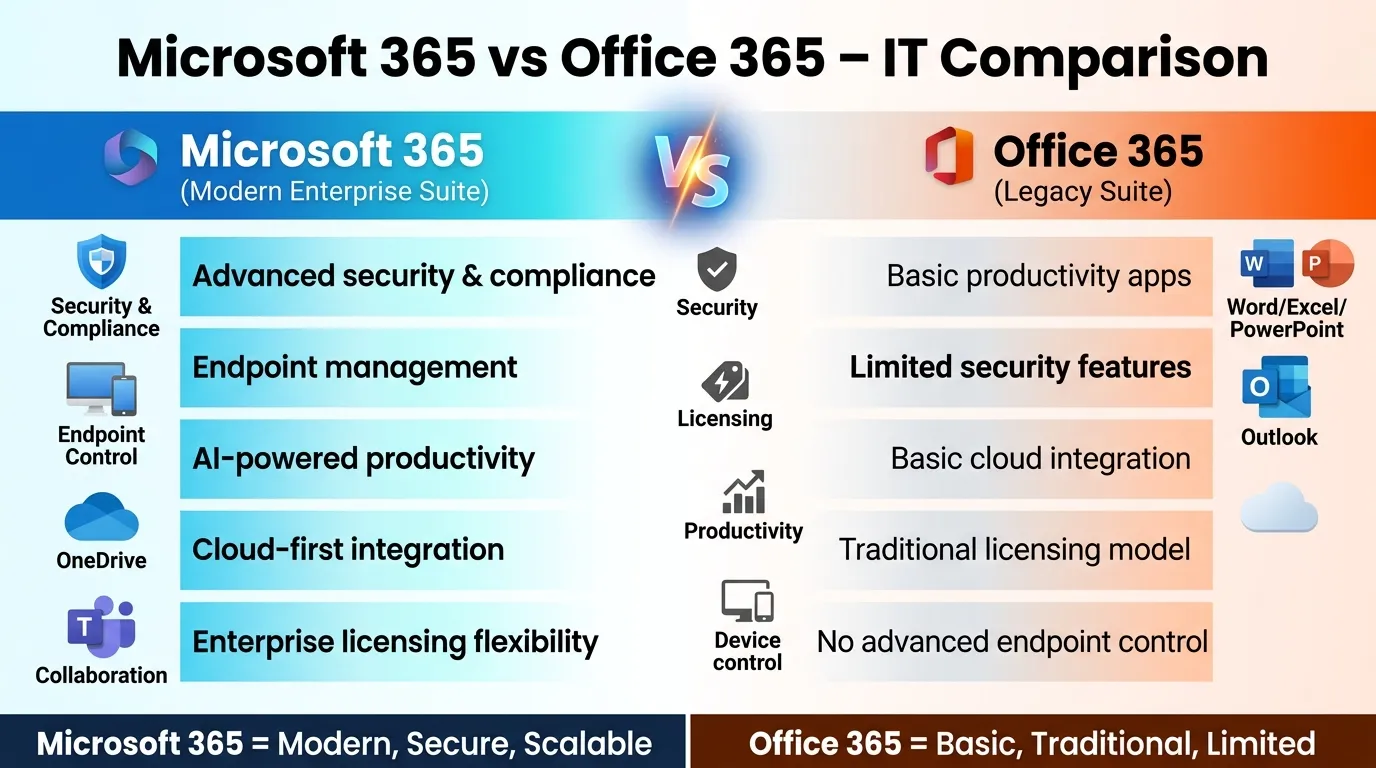
📊 Quick Comparison Table
| Feature | Microsoft 365 | Office 365 |
| Version | New & advanced | Older branding |
| Apps | Yes | Yes |
| Cloud | Advanced | Basic |
| Security | Strong | Limited |
| Collaboration | Full (Teams) | Basic |
| AI Features | Yes | Minimal |
| Device Control | Advanced | Limited |
Key Differences Between Microsoft 365 and Office 365
Here’s a deeper breakdown—not just surface-level differences, but what actually matters in real-world use.
1. Evolution & Naming
Office 365 is the older branding, originally built around Office apps and basic cloud services. Microsoft 365 is the modern evolution, designed as a complete productivity and security ecosystem that continues to grow with new features.
2. Feature Scope
Office 365 mainly focused on core tools like Microsoft Word, Microsoft Excel, and Microsoft PowerPoint.
Microsoft 365 expands this by adding cloud services, automation, device management, and security tools, making it a full platform rather than just software.
3. Cloud Integration
Microsoft 365 provides deep cloud integration through Microsoft OneDrive, enabling real-time syncing, automatic backups, and easy file access across devices.
Office 365 offered cloud storage, but it was more limited and less integrated.
4. Collaboration Power
With Microsoft Teams, Microsoft 365 allows users to chat, meet, call, and collaborate in real time within one platform.
Office 365 had collaboration features, but they were less unified and not as powerful.
5. Security & Compliance
Microsoft 365 includes advanced security features like:
- Threat protection
- Data loss prevention
- Identity and access management
Office 365 only provided basic security, which may not be enough for modern business risks.
6. Device & Endpoint Management
Microsoft 365 allows IT teams to manage company devices, enforce policies, and secure endpoints remotely.
Office 365 had little to no advanced device management capabilities.
7. AI & Smart Features
Microsoft 365 integrates AI into apps—like smart suggestions, automation, and data insights in Excel and Word.
Office 365 had minimal or no AI-driven functionality.
8. Updates & Upgrades
Microsoft 365 is always up to date, with continuous feature improvements and security patches.
Office 365 followed a more traditional update cycle, with fewer innovations.
9. Remote Work Support
Microsoft 365 is built for remote and hybrid work environments, enabling seamless communication and access from anywhere.
Office 365 wasn’t originally designed with this level of flexibility.
10. Integration with Ecosystem
Microsoft 365 integrates deeply with tools like Microsoft SharePoint and Microsoft Outlook.
Office 365 integrations were available but not as tightly connected.
11. Scalability
Microsoft 365 is highly scalable, making it suitable for individuals, small businesses, and large enterprises.
Office 365 was more limited in scaling advanced business needs.
12. Compliance & Regulatory Support
Microsoft 365 includes tools for compliance management, useful for industries like finance, healthcare, and education.
Office 365 had basic compliance support only.
13. Identity & Access Control
Microsoft 365 offers advanced identity tools like multi-factor authentication and access policies.
Office 365 lacked strong identity protection systems.
14. Cross-Platform Experience
Microsoft 365 delivers a seamless experience across desktop, mobile, and web apps, ensuring continuity of work.
Office 365 supported multiple platforms but with less consistency and integration.
15. Future Development & Innovation
Microsoft 365 is actively developed with AI, automation, and cloud-first innovations, making it future-ready.
Office 365 is essentially a legacy concept with no major forward-looking development.
Why the Right Choice Matters for IT Teams
For IT professionals, this isn’t just a naming difference—it impacts security, control, and scalability.
Choosing the wrong plan can lead to:
- Security gaps
- Poor device management
- Extra licensing costs
Security and Compliance Considerations
Microsoft 365 provides enterprise-grade protection through tools like:
- Identity security
- Multi-factor authentication
- Threat analytics
This makes it ideal for businesses handling sensitive data.
Device and Endpoint Control
Microsoft 365 allows IT teams to:
- Manage employee devices
- Enforce security policies
- Control remote access
This is something Office 365 did not fully support.
Managing Licensing Complexity
Microsoft 365 comes with multiple plans (Business, Enterprise, Education), which can be confusing.
But the advantage is flexibility:
- Pay only for what you need
- Scale as your organization grows
Supporting Productivity and User Experience
Microsoft 365 enhances user experience with:
- AI suggestions in Word & Excel
- Seamless file access across devices
- Faster collaboration workflows
Result: less time wasted, more productivity
Licensing Mistakes That Cost Time and Money
Many businesses:
- Buy higher plans than needed
- Ignore security features they already pay for
Choosing the right Microsoft 365 plan can save money and reduce complexity.
The Right License Is More Than Just Cost
The cheapest plan isn’t always the best.
The right choice depends on:
- Team size
- Security needs
- Remote work requirements
- IT management level
Which One Should You Choose?
✅ Choose Microsoft 365 if:
- You want latest tools and updates
- You need team collaboration
- You run a business or manage users
- Security matters to you
✅ Choose Office 365 if:
- You’re dealing with older plans or terminology
- You only need basic usage
Realistically: Microsoft 365 is the better choice for almost everyone today
FAQs – Microsoft 365 vs Office 365
1. Is Microsoft 365 the same as Office 365?
No, Microsoft 365 is the updated and more advanced version that includes Office apps plus cloud services, security, and collaboration tools.
2. Why did Microsoft change Office 365 to Microsoft 365?
Microsoft expanded the product beyond just Office apps, so the new name reflects a complete productivity and cloud ecosystem.
3. Which one should I choose today?
You should choose Microsoft 365 because it offers latest features, better security, and continuous updates.
4. Do both include Word, Excel, and PowerPoint?
Yes, both include apps like Microsoft Word, Microsoft Excel, and Microsoft PowerPoint, but Microsoft 365 provides more advanced features.
5. Is Microsoft 365 better for businesses?
Yes, Microsoft 365 is better for businesses because it includes tools like Microsoft Teams, along with advanced security and management features.
6. Can I use Microsoft 365 offline?
Yes, you can use apps offline, but internet is required for cloud syncing and collaboration features.
7. What cloud storage is included?
Microsoft 365 includes cloud storage through Microsoft OneDrive, allowing you to store and access files anytime.
8. Is Office 365 still available?
The name still exists in some places, but most services are now rebranded as Microsoft 365.
9. Is Microsoft 365 secure?
Yes, it includes advanced security features like data protection, threat detection, and identity management, making it highly secure.
10. What is the main difference in simple words?
Office 365 was mainly Office apps, while Microsoft 365 is a complete cloud-based productivity platform with extra features.
Conclusion
From an IT architecture standpoint, the choice between Microsoft 365 and Office 365 defines how efficiently an organization can scale, secure, and manage its digital environment.
Microsoft 365 is a future-ready enterprise platform built for security, scalability, and integration.
Office 365 is a legacy productivity suite suitable only for basic or transitional use cases.
For IT leaders, the decision should not be cost-driven alone—it should be risk-driven, scalability-driven, and security-driven.

I am content creator and comparison blogger focused on analyzing key differences between terms, concepts, and ideas to deliver accurate, easy-to-understand information. So I decided to create a platform where these differences are explained in the simplest way possible.