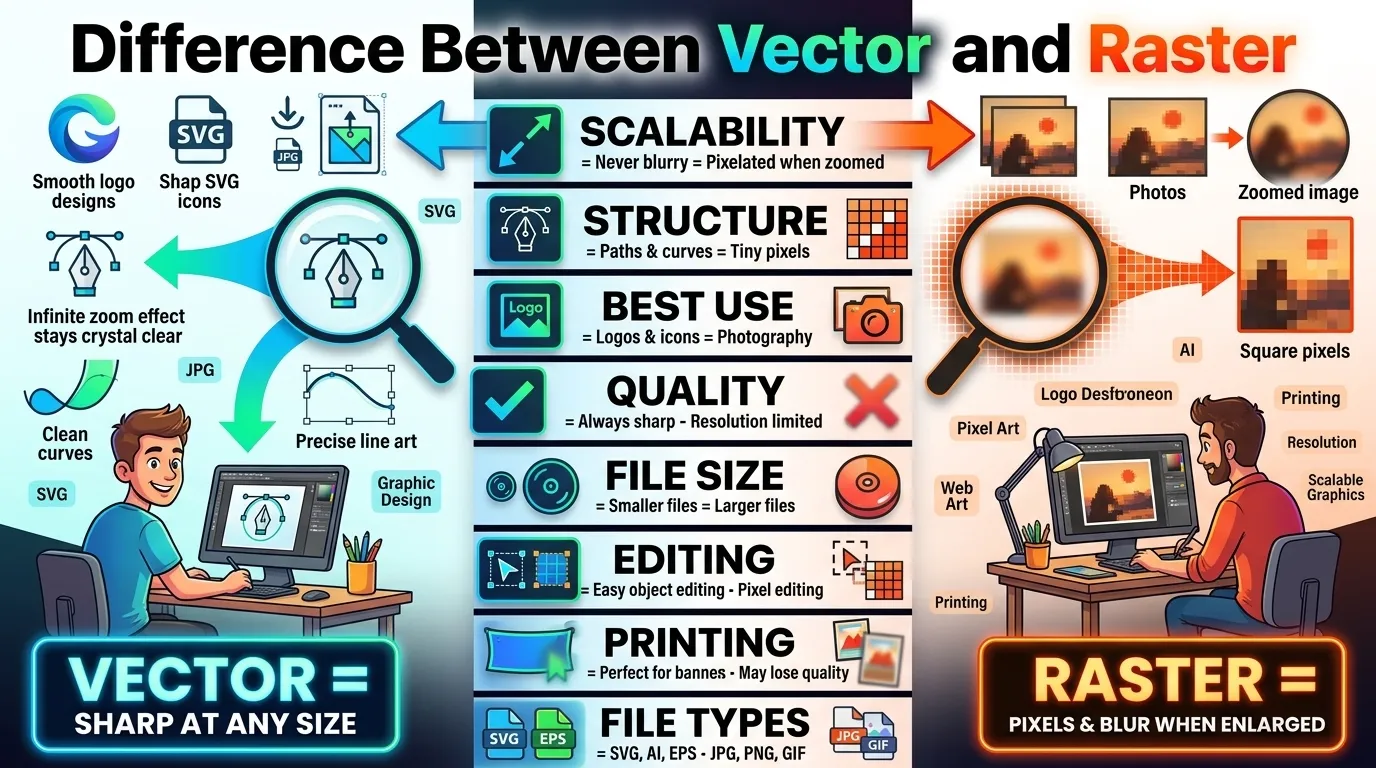
Many users get confused about the difference between vector and raster because both are used for digital images, graphic design, websites, printing, and branding. You may have seen blurry logos, pixelated photos, or perfectly sharp icons and wondered why that happens. The answer usually comes down to vector vs raster graphics.
In simple words, the difference between vector and raster is based on how images are created and stored. Vector graphics use mathematical paths and shapes, while raster graphics use tiny pixels. This affects image quality, file size, editing flexibility, and scalability.
Whether you use tools from Adobe, create social media posts for Instagram, upload thumbnails to YouTube, or design websites, understanding vector and raster formats is essential. In this guide, you will learn everything clearly with real-world examples, tables, expert insights, and practical use cases.
Quick Answer: Difference Between Vector and Raster
The main difference between vector and raster is that vector graphics are made using mathematical lines and shapes, while raster graphics are made using pixels.
- Vector images stay sharp at any size.
- Raster images lose quality when enlarged.
For example, a company logo created in SVG format remains perfectly clear on a billboard, while a JPG photo may become blurry if stretched too much.
Definition of Vector and Raster
- Vector: A type of graphic made with mathematical paths, curves, and shapes that can scale infinitely without losing quality.
- Raster: A type of image made from tiny colored pixels arranged in a grid. Quality decreases when resized too much.
Example
- SVG logo = Vector graphic
- JPG photograph = Raster graphic
Pronunciation of Both Terms (US & UK)
- Vector
- US: VEK-ter
- UK: VEK-tuh
- Raster
- US: RAS-ter
- UK: RAH-stuh
Now that the pronunciation and basic definitions are clear, let’s understand the real meaning behind vector and raster graphics and why they matter in modern digital design.
Vector vs Raster Comparison Table
| Feature | Vector Graphics | Raster Graphics |
| Structure | Made with mathematical paths | Made with pixels |
| Quality When Resized | Stays sharp at any size | Becomes blurry when enlarged |
| Best For | Logos, icons, illustrations | Photos, detailed images |
| File Size | Usually smaller | Often larger |
| Editing Flexibility | Easy to edit individual shapes | Harder to edit without quality loss |
| Common Formats | SVG, AI, EPS, PDF | JPG, PNG, GIF, BMP |
| Printing Quality | Excellent for large prints | Depends on resolution |
| Real-World Use | Branding and design systems | Photography and web images |
KEY DIFFERENCES EXPLAINED BETWEEN VECTOR AND RASTER
1. Image Construction
Vector graphics are created using mathematical equations. Raster graphics use a grid of pixels.
For example, an SVG logo created in Adobe Illustrator remains sharp forever, while a JPG image can lose detail when zoomed in.
2. Scalability
One major difference between vector and raster is scalability.
Vector images can grow from business card size to billboard size without losing quality. Raster images cannot do this because pixels become visible.
3. Best Use Cases
Raster graphics work best for photographs because they capture complex color details and textures. Vector graphics are ideal for logos, icons, and typography.
This is why brands like Meta use vector-based logos across apps, websites, and advertising materials.
4. File Size Differences
Simple vector files are usually smaller because they store mathematical instructions instead of millions of pixels.
However, high-detail vector artwork can sometimes become complex too.
5. Editing Process
In vector design software, each shape can be edited independently. Raster editing changes individual pixels.
Most beginners notice this difference when using Adobe Photoshop versus Illustrator.
6. Resolution Dependency
Raster graphics depend on resolution. Low-resolution images appear blurry on high-quality screens.
Vector graphics are resolution-independent.
7. Printing Performance
Professional printing companies prefer vector logos because they stay clean at large sizes.
Raster images require high DPI settings for quality printing.
What Is a Vector Graphic?
Vector graphics are digital images built using mathematical paths, anchor points, curves, and shapes.
Instead of storing millions of pixels, vector files store instructions like:
- Draw a line here
- Create a curve there
- Fill this shape with color
That is why vector graphics scale perfectly.
Common Vector File Formats
- SVG
- AI
- EPS
Where Vector Graphics Are Used
- Brand logos
- Website icons
- Mobile app UI
- Infographics
- Packaging design
In real scenarios, businesses often use vector graphics for consistent branding across websites, print media, social platforms, and advertising campaigns.
What Is a Raster Graphic?
Raster graphics are made from tiny pixels. Every pixel contains color information.
When you zoom into a raster image too much, the pixels become visible, causing blur or distortion.
Common Raster File Formats
- JPG
- PNG
- GIF
- BMP
- TIFF
Where Raster Graphics Are Used
- Photography
- Social media images
- Digital paintings
- Screenshots
- Web banners
Platforms like Instagram and YouTube mostly use raster formats because photographs and thumbnails require detailed color information.
Why Does the Difference Between Vector and Raster Matter?
Many beginners think image format does not matter until quality problems appear.
Here is why this topic is important:
For Businesses
A blurry logo damages brand professionalism.
For Designers
Choosing the wrong format creates editing and printing issues.
For SEO and Websites
Large raster files can slow websites, which may affect user experience and search rankings on Google.
For Social Media
Wrong image sizing can reduce visual quality and engagement.
Difference Between Vector and Raster in Web Design
Modern websites use both vector and raster graphics together.
Vector in Web Design
- SVG icons
- Responsive logos
- UI elements
- Scalable illustrations
Raster in Web Design
- Hero images
- Product photos
- Background photography
Many modern web developers prefer SVG graphics because they load quickly and remain sharp on retina displays.
Difference Between Vector and Raster for Printing
Printing is where the difference becomes extremely important.
Vector Printing Advantages
- Perfectly sharp text
- High-quality large banners
- Better logo reproduction
Raster Printing Challenges
- Requires high resolution
- May appear pixelated
- Larger file sizes
Professional printers usually request vector logo files for this reason.
Common Mistakes with Vector and Raster
1. Enlarging Low-Resolution Raster Images
Many beginners stretch JPG images too much, causing blur.
Fix: Use high-resolution images or switch to vector graphics.
2. Using Raster Logos for Printing
Raster logos often appear pixelated on banners.
Fix: Always keep a vector version of your logo.
3. Saving Everything as PNG
PNG is useful, but not ideal for every project.
Fix: Choose format based on purpose.
4. Confusing SVG with PNG
SVG is vector-based, while PNG is raster-based.
Fix: Understand the core structure of each format.
5. Ignoring File Size Optimization
Huge raster files slow websites.
Fix: Compress images and use SVG where possible.
Real Life Examples with Vector and Raster
Example 1: Company Logo
A business creates a logo in vector format so it can appear sharp on:
- Websites
- Business cards
- Billboards
Example 2: Photography Website
A photographer uploads raster JPG images because photos need detailed color information.
Example 3: Mobile Apps
Apps from Meta use vector icons because they scale across different screen sizes.
Example 4: YouTube Thumbnail Design
A thumbnail designer uses raster graphics for photos and vector text overlays for clarity.
Example 5: Ecommerce Product Images
Online stores use optimized raster images for products while using vector icons for navigation.
When to Use Each
Use Vector Graphics When:
- Designing logos
- Creating icons
- Making scalable illustrations
- Printing large graphics
- Designing UI elements
Use Raster Graphics When:
- Editing photographs
- Creating realistic artwork
- Designing social media photos
- Using texture-heavy visuals
In practical use, most professional projects combine both formats together.
Why People Get Confused in Vector and Raster
Similar Appearance
At normal size, both formats can look identical.
Software Overlap
Programs like Photoshop and Illustrator can sometimes handle both formats.
Internet Misunderstanding
Many online tutorials oversimplify the topic.
Export Confusion
People often convert vector files into raster formats without realizing it.
Expert Insight
From a professional design perspective, the best approach is not choosing vector or raster exclusively. Most successful digital projects use both strategically.
In real scenarios:
- Vector graphics handle structure and branding.
- Raster graphics handle realism and detail.
Most beginners think vector is always better because it scales infinitely. But that is not true for photography. Raster images remain the industry standard for cameras, social media visuals, and realistic textures.
Professional designers, developers, and marketing teams usually combine both formats to achieve the best balance between quality, flexibility, and performance.
Frequently Asked Questions
What is the main difference between vector and raster?
Vector graphics use mathematical paths, while raster graphics use pixels.
Which is better, vector or raster?
Neither is universally better. The right choice depends on your project.
Why do raster images become blurry?
Raster images lose quality when enlarged because pixels stretch.
Is PNG vector or raster?
PNG is a raster image format.
Is SVG a vector format?
Yes, SVG is one of the most popular vector formats.
Can a raster image become vector?
Yes, through a process called vector tracing, although results vary.
Why do companies prefer vector logos?
Vector logos remain sharp at every size.
Is Photoshop vector or raster?
Adobe Photoshop is mainly raster-based.
Is Illustrator used for vector graphics?
Yes. Adobe Illustrator is primarily a vector design tool.
Which format is best for websites?
Modern websites usually use both vector and raster graphics together.
Conclusion
Understanding the difference between vector and raster is essential for designers, marketers, businesses, developers, and everyday users. Vector graphics use mathematical paths that scale infinitely without losing quality, while raster graphics rely on pixels and work best for photographs and detailed visuals.
In simple words, vector is ideal for logos, icons, branding, and scalable design systems. Raster is better for photography, textures, and realistic imagery. That is why modern websites, apps, and social platforms combine both formats instead of relying on just one.
If you want crisp logos, responsive graphics, and clean printing results, vector graphics are usually the better choice. If you need realistic visuals with rich detail and color depth, raster graphics remain essential.

I am content creator and comparison blogger focused on analyzing key differences between terms, concepts, and ideas to deliver accurate, easy-to-understand information. So I decided to create a platform where these differences are explained in the simplest way possible.