If you have ever connected a monitor, gaming PC, laptop, or TV, you have probably wondered about the difference between DP and HDMI. Many users get confused because both cables carry high-quality video and audio, yet they are designed for different purposes.
The difference between DP and HDMI becomes important when choosing a monitor for gaming, professional work, streaming, or everyday use. While HDMI is commonly found on TVs and consumer devices, DisplayPort (DP) is often preferred for high-performance monitors and advanced computer setups.
In this guide, you’ll learn the complete difference between DP and HDMI, including speed, refresh rates, compatibility, gaming performance, real-world usage, and which option is best for your specific needs in 2026.
Quick Answer: Difference Between DP and HDMI
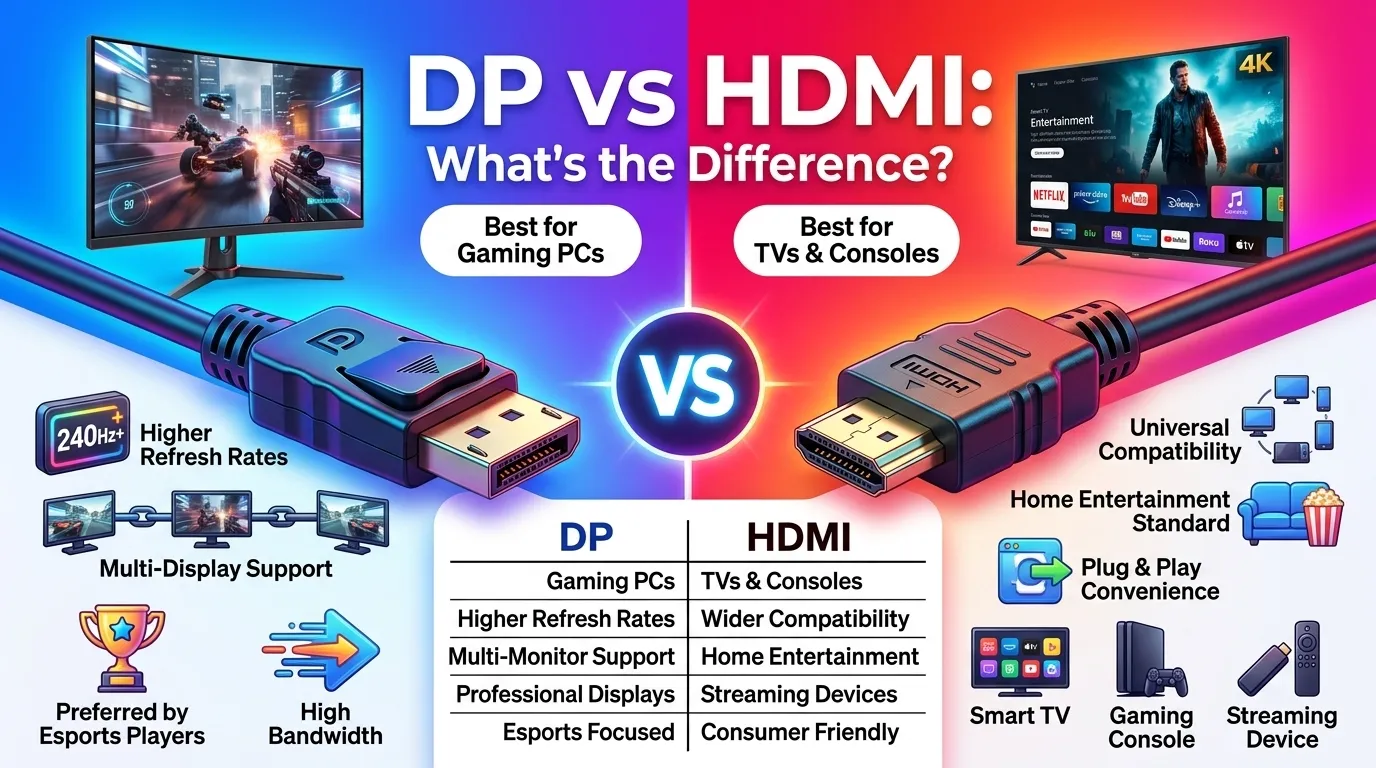
The main difference between DP (DisplayPort) and HDMI (High-Definition Multimedia Interface) is their intended use.
- DisplayPort (DP) is primarily designed for computers, gaming monitors, and professional displays.
- HDMI is mainly designed for TVs, home entertainment systems, streaming devices, and gaming consoles.
Example
If you own a 240Hz gaming monitor, DisplayPort is usually the better choice because it supports higher refresh rates more easily. However, if you’re connecting a PlayStation, Xbox, or smart TV, HDMI is generally the preferred option.
Definition of DP and HDMI
DP (DisplayPort)
DisplayPort (DP): A digital display interface developed for connecting computers, graphics cards, monitors, and professional display systems. It supports high resolutions, high refresh rates, and advanced multi-monitor setups.
HDMI (High-Definition Multimedia Interface)
HDMI: A digital audio and video interface commonly used for TVs, gaming consoles, projectors, streaming devices, and home entertainment systems.
Simple Example
- DP → Gaming PC to Monitor
- HDMI → TV to Console
Pronunciation of DP and HDMI
| Term | US Pronunciation | UK Pronunciation |
| DP (DisplayPort) | dih-SPLAY-port | dih-SPLAY-port |
| HDMI | H-D-M-I | H-D-M-I |
Now that we know what both technologies are, let’s understand how they compare in real-world performance and why manufacturers continue to use both standards.
Difference Between DP and HDMI Comparison Table
| Feature | DisplayPort (DP) | HDMI |
| Full Name | DisplayPort | High-Definition Multimedia Interface |
| Primary Use | PCs and Monitors | TVs and Entertainment Devices |
| Gaming Performance | Excellent | Very Good |
| Refresh Rate Support | Higher on many monitors | Depends on HDMI version |
| Multi-Monitor Support | Native Daisy Chaining | Limited |
| Audio Support | Yes | Yes |
| Adaptive Sync | Excellent Support | Supported on newer versions |
| Common Devices | PCs, GPUs, Monitors | TVs, Consoles, Streaming Devices |
| Connector Locking | Available on many cables | Usually not available |
| Professional Workstations | Widely Used | Less Common |
Mini Summary
DisplayPort focuses on computer performance and monitor flexibility, while HDMI focuses on universal compatibility across consumer electronics.
Key Differences Explained Between DP and HDMI
1. Purpose and Design Philosophy
The biggest difference between DP and HDMI is why they were created.
DisplayPort was designed specifically for computers and professional display environments. HDMI was designed for home entertainment devices.
Real-Life Example
A gaming PC connected to a 360Hz esports monitor typically uses DP, while a smart TV connected to a streaming device uses HDMI.
2. Refresh Rate Capability
Refresh rate determines how smooth motion appears on screen.
DisplayPort generally offers higher refresh-rate support at high resolutions, making it popular among competitive gamers.
Real-Life Example
A 1440p 240Hz monitor often performs best through DP because manufacturers optimize gaming monitors around DisplayPort standards.
3. Multi-Monitor Support
DisplayPort includes a feature called Multi-Stream Transport (MST).
This allows multiple monitors to be connected through a single DisplayPort output.
HDMI does not provide the same level of built-in daisy-chaining support.
Real-Life Example
Financial analysts, software developers, and content creators frequently use DP to manage multiple displays.
4. Gaming Experience
For PC gaming, DP is often preferred because it supports high refresh rates and advanced synchronization technologies.
For console gaming, HDMI remains the standard choice.
Real-Life Example
A gamer using an NVIDIA or AMD graphics card with a high-refresh monitor often connects via DP for optimal performance.
5. Compatibility
HDMI wins when it comes to universal compatibility.
You can find HDMI ports on:
- TVs
- Projectors
- Soundbars
- Streaming devices
- Gaming consoles
- Home theater systems
DisplayPort is less common outside computer-related equipment.
6. Audio Transmission
Both technologies carry audio and video through a single cable.
Many users mistakenly believe DP only carries video, but modern DisplayPort versions fully support digital audio.
Real-Life Example
A monitor with built-in speakers can receive both video and sound through either HDMI or DP.
7. Cable Locking Mechanism
Many DisplayPort cables include a locking connector.
This helps prevent accidental disconnections.
HDMI cables generally rely on friction only.
Practical Benefit
In offices and professional environments, DP’s locking feature can reduce connection issues.
8. Future Scalability
DisplayPort standards are often developed with future monitor technology in mind.
As monitor resolutions and refresh rates continue increasing, DP remains popular among enthusiasts and professional users.
HDMI continues evolving as well, particularly for TV and home entertainment applications.
Why Does the Difference Between DP and HDMI Exist?
The answer lies in their target audiences.
HDMI was created to simplify home entertainment systems by replacing multiple cable types.
DisplayPort was created to improve computer display technology and support professional workflows.
Because these goals are different, both standards evolved differently over time.
What Is DisplayPort Used For?
DisplayPort is commonly used for:
- Gaming monitors
- Workstations
- Graphic design setups
- Video editing systems
- Multi-monitor offices
- Engineering workstations
- High-refresh esports displays
Many modern monitors from companies such as Dell, ASUS, and LG include DisplayPort because of its flexibility and performance advantages.
What Is HDMI Used For?
HDMI dominates the consumer electronics market.
You will find it on:
- Smart TVs
- Streaming devices
- Blu-ray players
- Home theaters
- Gaming consoles
- Projectors
Companies such as Sony, Samsung, and Microsoft heavily rely on HDMI across their entertainment ecosystems.
DP vs HDMI for Gaming: Which Is Better?
This is one of the most searched questions online.
Choose DisplayPort If:
- You play competitive PC games.
- You own a 144Hz, 240Hz, or 360Hz monitor.
- You want maximum refresh-rate support.
- You use Adaptive Sync technologies.
Choose HDMI If:
- You primarily play on consoles.
- You connect devices to a TV.
- You want maximum compatibility.
- Your monitor does not include DisplayPort.
DP vs HDMI Bandwidth and Resolution Comparison
Bandwidth determines how much data a cable can transmit. Higher bandwidth allows support for higher resolutions, higher refresh rates, better color depth, and smoother visual performance.
| Feature | DisplayPort | HDMI |
| Typical Use Case | PC Monitors | TVs and Consumer Devices |
| High Refresh Rate Support | Excellent | Very Good |
| Multi-Monitor Capability | Built-In Support | Limited |
| Gaming Focus | Strong | Strong |
| Professional Workflows | Excellent | Good |
| Home Entertainment | Good | Excellent |
| Adaptive Sync Support | Excellent | Good |
| Future Monitor Scalability | Excellent | Very Good |
Why Bandwidth Matters
Imagine a highway.
A wider highway can carry more cars at the same time. Similarly, higher bandwidth allows more display data to move between your device and screen.
Real-World Example
A content creator editing 4K videos while running multiple monitors may benefit from DisplayPort’s flexibility.
Meanwhile, a family watching movies on a large smart TV will likely notice no practical difference because HDMI already handles those requirements exceptionally well.
Difference Between DP and HDMI Table
| Feature | DisplayPort (DP) | HDMI | Similarity |
| Meaning | Computer-focused display interface | Entertainment-focused display interface | Both transfer digital signals |
| Primary Devices | PCs and monitors | TVs and media devices | Both connect displays |
| Gaming Usage | Popular among PC gamers | Popular among console gamers | Both support gaming |
| Audio Support | Supports audio | Supports audio | Single-cable solution |
| Video Quality | Excellent | Excellent | Both support high resolutions |
| Multi-Monitor Support | Native support | Limited support | Both can connect displays |
| Professional Use | Widely used | Occasionally used | Both serve visual workloads |
| Consumer Adoption | Common in monitors | Common in TVs | Both are global standards |
This table clearly shows the difference and similarity between DP and HDMI for quick understanding.
Which Is Better: DP or HDMI?
The answer depends entirely on your needs.
For Competitive Gamers
DisplayPort is usually the better option.
Reasons:
- Higher refresh-rate compatibility
- Better monitor support
- Strong integration with gaming displays
- Excellent adaptive sync support
For Console Gamers
HDMI is often the better choice.
Reasons:
- Native console compatibility
- TV optimization
- Easy setup
- Universal support
For Office Users
Either option works well.
Most office applications such as spreadsheets, web browsing, presentations, and video calls do not push display technology to its limits.
For Creative Professionals
DisplayPort often provides greater flexibility for:
- Multi-monitor editing
- Animation work
- Video production
- Graphic design
- CAD applications
Why Do High-End Monitors Often Include DisplayPort?
Many users notice that premium gaming monitors emphasize DisplayPort.
This happens because monitor manufacturers design these products around PC users who prioritize:
- High refresh rates
- Low latency
- Multi-display setups
- Advanced graphics card compatibility
In practical use, esports players frequently choose DP because it aligns with how gaming monitors are engineered.
Common Mistakes With Difference Between DP and HDMI
Understanding the difference between DP and HDMI becomes easier when you avoid these common mistakes.
Mistake 1: Assuming HDMI Is Always Worse
Many beginners think HDMI is outdated.
Reality:
Modern HDMI versions are extremely capable and power many advanced gaming and entertainment systems.
Fix
Choose based on your device, not internet myths.
Mistake 2: Ignoring Monitor Specifications
Some users buy expensive cables without checking monitor limitations.
Fix
Always verify:
- Maximum refresh rate
- Resolution support
- Available ports
Mistake 3: Thinking DP Improves Graphics Quality Automatically
DisplayPort does not magically improve image quality.
The monitor, graphics card, and settings also matter.
Fix
Focus on the complete system rather than the cable alone.
Mistake 4: Buying the Wrong Cable Version
Not all cables support the same performance level.
Fix
Check manufacturer specifications before purchasing.
Mistake 5: Using Adapters Without Understanding Limitations
Adapters may reduce supported features depending on the conversion type.
Fix
Use native connections whenever possible.
Mistake 6: Believing Audio Works Only Through HDMI
This misconception remains surprisingly common.
Fix
Modern DisplayPort supports audio transmission as well.
Real-Life Examples With DP and HDMI
Understanding theory is useful, but real scenarios make the concept easier.
Example 1: Home User
A person connects a laptop to a television for streaming movies.
Best Choice
HDMI
Reason:
Maximum compatibility and easy setup.
Example 2: Competitive Gamer
A player uses a gaming PC with a 240Hz monitor.
Best Choice
DisplayPort
Reason:
Optimized support for high-refresh gaming.
Example 3: Video Editor
A professional editor uses three monitors simultaneously.
Best Choice
DisplayPort
Reason:
Better multi-monitor flexibility.
Example 4: Corporate Office
An employee uses dual displays for productivity.
Best Choice
Either HDMI or DP
Reason:
Typical office tasks do not require extreme display performance.
Example 5: Console Gaming Setup
A gamer connects a console to a 4K television.
Best Choice
HDMI
Reason:
Consoles are designed around HDMI connectivity.
Example 6: Engineering Workstation
An engineer runs CAD software across multiple displays.
Best Choice
DisplayPort
Reason:
Professional monitor configurations benefit from DP features.
When to Use Each
Use DisplayPort When:
- You own a gaming PC.
- You use high-refresh monitors.
- You need multiple displays.
- You perform professional creative work.
- You want advanced monitor features.
Use HDMI When:
- You connect to a TV.
- You use streaming devices.
- You play on consoles.
- You need universal compatibility.
- You prefer simple plug-and-play connections.
Why People Get Confused About DP and HDMI
Many users search for the difference between DP and HDMI because both technologies appear very similar.
Several factors contribute to this confusion.
Similar Appearance
Both cables connect screens and carry audio and video.
At first glance, they seem interchangeable.
Marketing Language
Manufacturers often promote features such as:
- 4K
- HDR
- High refresh rates
- Gaming support
These features can be available through both standards, making distinctions less obvious.
Evolving Standards
Both technologies continue to improve.
Newer versions often blur performance differences that existed years ago.
Mixed Online Advice
Many articles oversimplify the topic.
Statements like “DP is always better” or “HDMI is outdated” ignore real-world usage scenarios.
Expert Insight
From a display technology perspective, neither DisplayPort nor HDMI is universally superior.
The better choice depends on the environment.
In real scenarios, most beginners focus too heavily on cable names and not enough on device compatibility.
Professional system builders typically start by asking:
- What device is being connected?
- What resolution is required?
- What refresh rate is needed?
- How many displays will be used?
Answering those questions usually reveals the correct connection standard immediately.
The most effective setup is the one that matches your hardware ecosystem rather than chasing specifications you may never actually use.
Frequently Asked Questions
Is DisplayPort better than HDMI for gaming?
For PC gaming, DisplayPort is often preferred because of its strong support for high refresh rates and gaming monitors.
Does DisplayPort have better image quality than HDMI?
Not necessarily.
If both connections support the required resolution and refresh rate, image quality is usually identical.
Can DisplayPort carry audio?
Yes.
Modern DisplayPort supports both audio and video through a single cable.
Why do gaming monitors use DisplayPort?
Many gaming monitors are designed around PC users who require high refresh rates and advanced display features.
Is HDMI enough for 4K gaming?
Yes.
Modern HDMI implementations support 4K gaming very effectively.
Can I use HDMI and DisplayPort at the same time?
Yes.
Many computers support multiple displays using both connection types simultaneously.
Which is better for multiple monitors?
DisplayPort is generally preferred because it offers stronger multi-monitor capabilities.
Do consoles use DisplayPort?
Most gaming consoles primarily use HDMI rather than DisplayPort.
Should I buy a DP cable or HDMI cable?
Buy the cable that matches your device requirements, monitor capabilities, and intended usage.
Conclusion
Understanding the difference between DP and HDMI is easier once you focus on how each technology is designed to be used. DisplayPort was created primarily for computers, professional workstations, and high-performance gaming monitors, while HDMI was built to simplify connections across televisions, consoles, streaming devices, and home entertainment systems.
For most users, neither option is automatically better. The right choice depends on your hardware, display requirements, and everyday usage. If you are a competitive PC gamer running a high-refresh monitor, DisplayPort is often the preferred solution. If you use a smart TV, gaming console, projector, or media device, HDMI remains the most practical and widely compatible option.
In real-world situations, image quality is usually determined more by your display, graphics hardware, and settings than by whether you choose DP or HDMI. The smartest approach is to match the connection type to your specific setup rather than chasing specifications alone.

My name is Ryan Mitchell, and I am a comparison content writer based in the United States. I specialize in creating clear and easy-to-understand articles that explain the differences between similar concepts, products, and ideas. My work focuses on helping readers quickly understand what makes two things different so they can make better decisions.