The difference between font and typeface is one of the most commonly misunderstood topics in typography. Many users, designers, bloggers, and even marketing professionals use these terms interchangeably, but they are not the same thing.
Understanding the difference between font and typeface helps you choose better typography for websites, branding, presentations, social media graphics, and printed materials. Whether you’re creating content for Google Docs, designing posts for Instagram, building ads for Meta, or editing videos for YouTube, typography plays a major role in communication.
In this guide, you’ll learn the exact difference between font and typeface, why the distinction exists, how each is used, common mistakes people make, and practical examples that make the concept easy to understand.
Quick Answer: Difference Between Font and Typeface
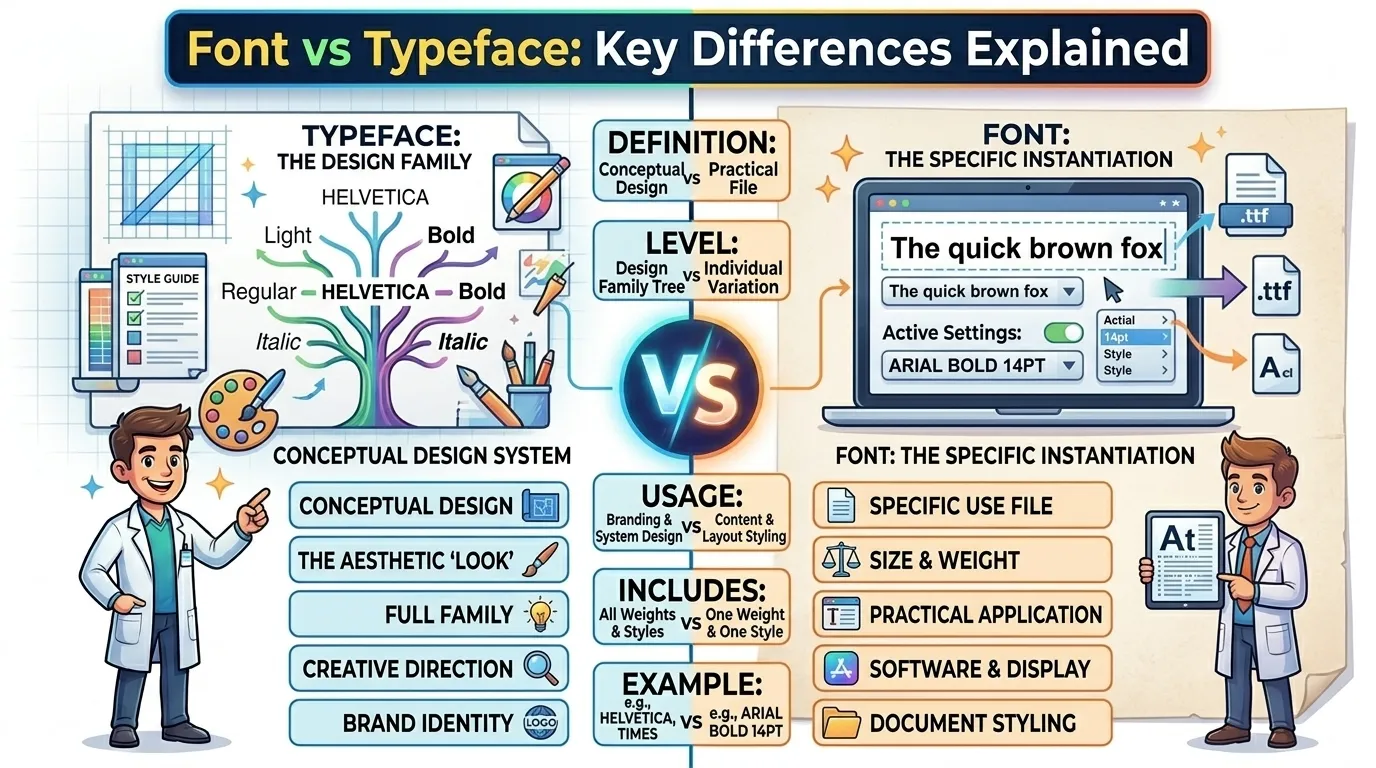
A typeface is the overall design style of letters, numbers, and symbols, while a font is a specific variation of that typeface.
Example:
- Arial = Typeface
- Arial Bold 14pt = Font
Think of a typeface as a music album and a font as a specific song from that album.
Definition of Font and Typeface
- Typeface: A complete design family of characters that share the same visual style. Examples include Arial, Times New Roman, Helvetica, and Garamond.
- Font: A specific version of a typeface defined by weight, size, width, or style. Examples include Arial Bold, Arial Italic, or Arial Regular 12pt.
Simple Example:
Typeface = Arial
Font = Arial Bold 16pt
Pronunciation of Both Terms
| Term | US Pronunciation | UK Pronunciation |
|---|---|---|
| Typeface | TY-pe-face | TY-pe-face |
| Font | Font | Font |
Now that the definitions are clear, let’s understand why these terms exist separately and how typography professionals use them in real-world projects.
Font vs Typeface Comparison Table
| Feature | Typeface | Font |
|---|---|---|
| Meaning | Overall visual design family | Specific variation of a typeface |
| Scope | Broad category | Individual style |
| Includes | Multiple fonts | Single style instance |
| Example | Helvetica | Helvetica Bold 14pt |
| Purpose | Defines design identity | Defines exact appearance |
| Usage | Branding and visual systems | Actual implementation |
| Flexibility | Contains many styles | One selected style |
| Design Level | Conceptual design | Practical application |
| Digital Use | Font family selection | Specific formatting choice |
| Printing Use | Typeface family reference | Exact print specification |
Key Differences Explained Between Font and Typeface
1. One Is a Family, the Other Is a Member
A typeface contains many fonts.
For example, Helvetica includes Regular, Bold, Italic, and Light fonts.
2. Typeface Focuses on Design
A typeface represents the artistic appearance of characters.
When designers discuss branding, they usually talk about typefaces.
3. Font Focuses on Execution
A font is what you actually select inside software like Microsoft Word or Adobe Photoshop.
4. Fonts Include Technical Attributes
Fonts often specify:
- Weight
- Width
- Size
- Style
These details are not part of the typeface definition itself.
5. Typeface Creates Consistency
Brands use a typeface family to maintain visual identity across all materials.
6. Fonts Control Specific Presentation
Different fonts from the same typeface can create completely different visual effects.
7. Historical Origins Differ
Historically, fonts referred to physical metal letter sets used in printing presses, while typefaces referred to the design of those letters.
8. Modern Software Blurs the Line
Today, many software platforms use the word “font” for convenience, causing confusion among users.
What Is a Typeface and Why Does It Matter?
A typeface is the visual personality of written communication.
When you see a clean, modern brand, the typeface contributes heavily to that impression.
Popular typefaces include:
- Helvetica
- Arial
- Garamond
- Times New Roman
- Futura
- Roboto
Each typeface communicates a different mood.
For example:
- Helvetica feels modern.
- Garamond feels traditional.
- Futura feels futuristic.
- Roboto feels digital and technology-focused.
This is why companies carefully choose typefaces for branding.
What Is a Font and How Does It Work?
A font is the specific tool used to display text.
For example, within the Roboto typeface you may find:
- Roboto Light
- Roboto Regular
- Roboto Medium
- Roboto Bold
- Roboto Black
Each variation is technically a different font.
When creating a document, you’re actually selecting a font rather than an entire typeface family.
Why Does the Difference Between Font and Typeface Exist?
Many beginners wonder why two separate terms are necessary.
The answer comes from printing history.
Before computers existed, printers used metal blocks for each character style.
A typeface represented the design.
A font represented a complete set of metal letters in a particular size and weight.
For example:
- Garamond 10pt Bold = One font
- Garamond 12pt Regular = Another font
The distinction helped printers organize physical type systems efficiently.
How the Difference Between Font and Typeface Applies in Modern Design
Today’s digital tools still rely on this typography structure.
Whether you’re designing:
- Websites
- Mobile apps
- Social media posts
- Marketing materials
- User interfaces
you are working with both typefaces and fonts.
For example, Google’s Android design system heavily uses the typeface Roboto, while designers choose specific Roboto fonts depending on context.
Similarly, Meta products often use carefully selected font variations for readability across different screen sizes.
Difference Between Font and Typeface in Branding
Typography is a major branding asset.
Companies use typefaces to establish identity.
Examples include:
- Google uses typography that emphasizes clarity and accessibility.
- Meta focuses on modern digital readability.
- YouTube uses typography optimized for screens.
- Instagram relies on typography that complements visual content.
Brand teams usually define a typeface family and then specify approved fonts for different applications.
Typeface Categories You Should Know
Serif Typefaces
Features small decorative strokes.
Examples:
- Times New Roman
- Garamond
- Baskerville
Best for:
- Books
- Newspapers
- Academic content
Sans-Serif Typefaces
Clean and modern appearance.
Examples:
- Arial
- Helvetica
- Roboto
Best for:
- Websites
- Mobile apps
- User interfaces
Script Typefaces
Designed to resemble handwriting.
Best for:
- Invitations
- Luxury branding
Display Typefaces
Created for attention-grabbing headlines.
Best for:
- Posters
- Advertisements
- Social media graphics
Difference and Similarity Between Font and Typeface
| Feature | Typeface | Font | Similarity |
|---|---|---|---|
| Purpose | Defines visual style | Displays text style | Both influence readability |
| Typography Role | Design system | Specific implementation | Both belong to typography |
| Communication | Creates personality | Creates presentation | Both affect user perception |
| Branding | Supports identity | Supports consistency | Both strengthen brand image |
| Digital Design | Used in design planning | Used during execution | Both appear in software |
| Printing | Design framework | Physical or digital output | Both support publishing |
| User Experience | Shapes visual tone | Shapes readability | Both impact UX |
| Text Appearance | Overall family look | Exact styling choice | Both determine text aesthetics |
This table clearly shows the difference and similarity between difference between font and typeface for quick understanding.
Common Mistakes With Font and Typeface
Mistake 1: Using Both Terms Interchangeably
Many people call every text style a font.
Fix: Remember that a font belongs to a typeface.
Mistake 2: Assuming Typeface Means Font Size
Typeface has nothing to do with size.
Fix: Size is a font attribute.
Mistake 3: Ignoring Font Variations
Different font weights affect readability.
Fix: Test Regular, Medium, and Bold options.
Mistake 4: Choosing Typography Based Only on Appearance
Typography should support communication goals.
Fix: Consider readability and audience.
Mistake 5: Mixing Too Many Typefaces
This creates visual inconsistency.
Fix: Limit projects to 2–3 typefaces.
Real-Life Examples of Font and Typeface
Example 1: Personal Use
A student writes an essay using Times New Roman.
- Typeface: Times New Roman
- Font: Times New Roman Regular 12pt
Example 2: Business Presentation
A company presentation uses Roboto.
- Typeface: Roboto
- Font: Roboto Bold 28pt
Example 3: Website Design
A developer selects Helvetica.
- Typeface: Helvetica
- Font: Helvetica Regular 16px
Example 4: Mobile App Interface
Buttons use:
- Typeface: Roboto
- Font: Roboto Medium
Example 5: Advertising Campaign
Headlines use:
- Typeface: Futura
- Font: Futura Bold
When to Use Each
Use Typeface When:
- Discussing branding
- Creating design systems
- Talking about visual identity
- Selecting typography families
Use Font When:
- Formatting documents
- Setting sizes
- Choosing weights
- Implementing designs
A simple rule:
Designers choose typefaces. Users apply fonts.
Why People Get Confused in Font and Typeface
Several reasons contribute to confusion.
Software Terminology
Most programs label everything as a font.
Everyday Language
The word “font” became more popular than “typeface.”
Educational Gaps
Many schools teach basic typography without explaining technical distinctions.
Digital Evolution
Modern operating systems simplified terminology for easier adoption.
As a result, even professionals sometimes use the terms casually.
Expert Insight
From a professional typography perspective, understanding the distinction is more valuable than memorizing definitions.
In real design workflows, teams usually discuss typefaces when building brand systems and fonts when implementing those systems.
Most beginners focus only on appearance. Experienced designers focus on consistency, readability, accessibility, and user experience.
A useful industry mindset is:
Typeface defines identity. Font defines execution.
That single sentence captures the practical difference better than most technical definitions.
Frequently Asked Questions
Is a font the same as a typeface?
No. A typeface is the overall design family, while a font is a specific variation of that family.
What is the easiest way to remember the difference?
Think of a typeface as a family and a font as one member of that family.
Is Arial a font or a typeface?
Arial is technically a typeface.
Is Arial Bold a font?
Yes. Arial Bold is a font within the Arial typeface family.
Why do people use the terms interchangeably?
Modern software often labels typefaces as fonts, which causes confusion.
Do designers care about the difference?
Yes. Professional designers typically distinguish between the two terms.
Does the difference matter in web design?
Yes. Understanding typography helps create better user experiences and stronger branding.
What is a font family?
A font family is a collection of related fonts within the same typeface.
Is Helvetica a font or typeface?
Helvetica is a typeface containing multiple fonts.
Why is typography important?
Typography affects readability, brand perception, accessibility, and overall communication effectiveness.
Conclusion
The difference between font and typeface is simple once you understand the relationship between the two. A typeface is the complete visual design family, while a font is a specific variation within that family. In practical terms, Helvetica, Arial, and Roboto are typefaces, while Helvetica Bold, Arial Italic, and Roboto Medium are fonts.
The most important takeaway is this: a typeface represents the design concept, and a font represents the specific implementation of that design. Once you view typography through that lens, the confusion disappears. Whether you’re a beginner learning typography or a professional refining your design knowledge, knowing the difference between font and typeface helps you make smarter visual communication decisions and build more consistent, professional-looking projects.

I am content creator and comparison blogger focused on analyzing key differences between terms, concepts, and ideas to deliver accurate, easy-to-understand information. So I decided to create a platform where these differences are explained in the simplest way possible.